Given two files, sample1.txt and sample1.sh, that I want to archive, which means combining files together (different than compressing them):
$ tar -csv ThisIsACompressedTarFile.tar sample1.txt sample1.sh
This gives us:
$ ls -l
ThisIsAcompressedTarFile.tar
sample1.txt
sample1.sh
We can peek into the Tar file without extracting the files using -t option
$ tar -tvf ThisIsACompressedTarFile.tar
> sample1.txt
> sample1.sh
We can extract those files using the -x (extract) switch:
$ tar -xvf ThisIsACompressedTarFile.tar
> sample1.txt
> sample1.sh
Now that we have those files combined together, the first step in compressing files, using the tar command, we can now look at compression.
There are three different commands: compress (fastest, but the files are larger), bzip2 (slowest, but resultant files are smallest), and gzip (in between those other two). Gzip is the most commonly used utility in Linux
$ gzip ThisIsACompressedTarFile.*This will result in a compressed file- take a look at those size diffs (5th column):
$ ls -l
$ gunzip TryThisTar.tar.gz will decompress this file, going from 287 > 10240 again for file size.
Now, let’s take a look at bzip2, which has the smallest files:
$ bzip2 TryThisTar.*
$ ls -l
Interesting, the bzip2 compressed file was 297, bigger than gzip (not what I had expected!)
We uncompress the bzip2 file like so:
$ bunzip2 TryThisTar.tar.bz2
// this will bring us back to the 10240 sized .tar (archive-format) file again.
Finally, we have compress – this gives a 519 byte sized file.
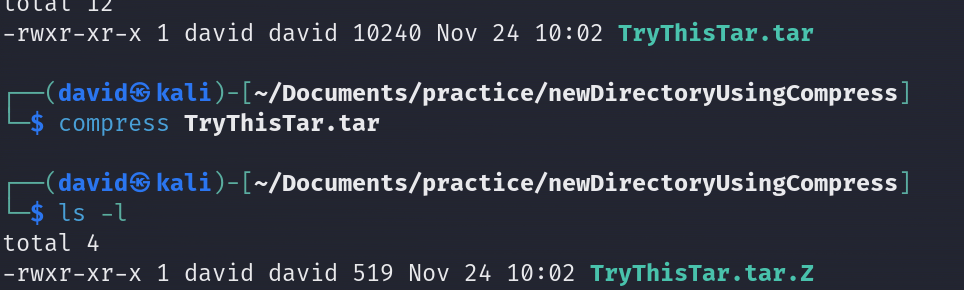
$ uncompress TryThisTar*
// to give us back the .tar formatted archived file again davethemaker