In my last post, we walked through the building out of a database, first starting with an ER diagram, then translating that into tables, columns, attributes. In this post, we’re going to dive deeper into SQL.
For creating a table, we use this kind of syntax:
CREATE TABLE cars (
    id SERIAL PRIMARY KEY,
    year INT,
    make TEXT NOT NULL,
    model TEXT NOT NULL
);
Then, we insert data into the table:
INSERT INTO cars (year, make, model)
VALUES (2020, 'Toyota', 'Prius');

INSERT INTO cars (year, make, model)
VALUES (2012, 'Ford', 'Focus');
Let’s check the data by right clicking the table name and selecting View/Edit Data > All Rows:
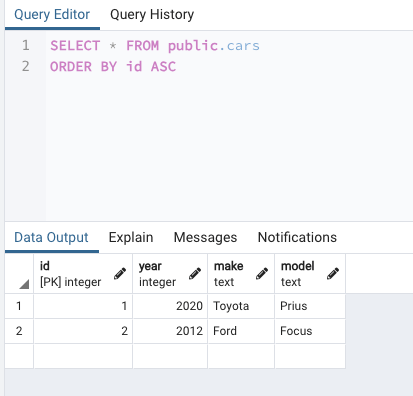
Nice. Let’s edit the table structure:
ALTER TABLE cars
ADD wheel_count INT NOT NULL DEFAULT 4;
Let’s add a few more cars:
INSERT INTO cars (year, make, model)
VALUES (2020, 'Nissan', 'Altima');
INSERT INTO cars (make, model, wheel_count)
VALUES ('Elio', 'P5', 3);
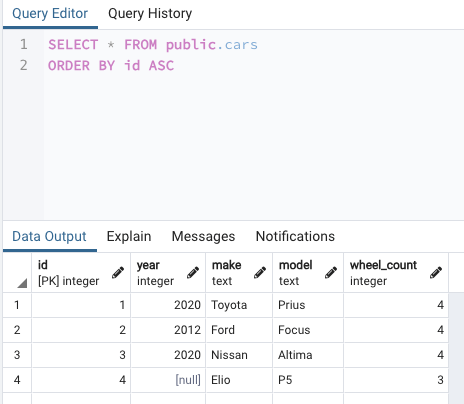
Let’s see what we have so far:
Let’s try a DELETE command:
DELETE FROM cars
WHERE year IS NULL;
This will delete the Elio P5 row, which had a year value of NULL.
Here’s a SQL statement that will enforce the foreign key constraint between two tables: teams and divisions. If a division is deleted, then any teams records that referrence that division will have it’s division_id reference set to NULL:
CREATE TABLE divisions (
    id SERIAL PRIMARY KEY,
    name TEXT NOT NULL UNIQUE
);

CREATE TABLE teams (
    id SERIAL PRIMARY KEY,
    city TEXT NOT NULL,
    name TEXT NOT NULL UNIQUE,
    home_color TEXT NOT NULL,
    away_color TEXT,
    division_id INT
);

ALTER TABLE teams
ADD CONSTRAINT fk_teams_divisions
FOREIGN KEY (division_id)
REFERENCES divisions (id)
ON DELETE SET NULL;
This is tricky. In the teams table, we are saying that division_id column is a foreign key. That foreign key refers to the id column in the divisions table. If the latter is deleted, then that foreign key (division_id) will be set to NULL.
 davethemaker