LIke other posts I’ve made recently, this one will detail my efforts to learn the Flask framework hand-in-hand with what I’ve been learning recently: Python, SQL, databases, and more. There’s a lot of information, both conceptual and technical, and it’s really helpful to have these kinds of notes to be able to reference down the road. Let’s get to it:
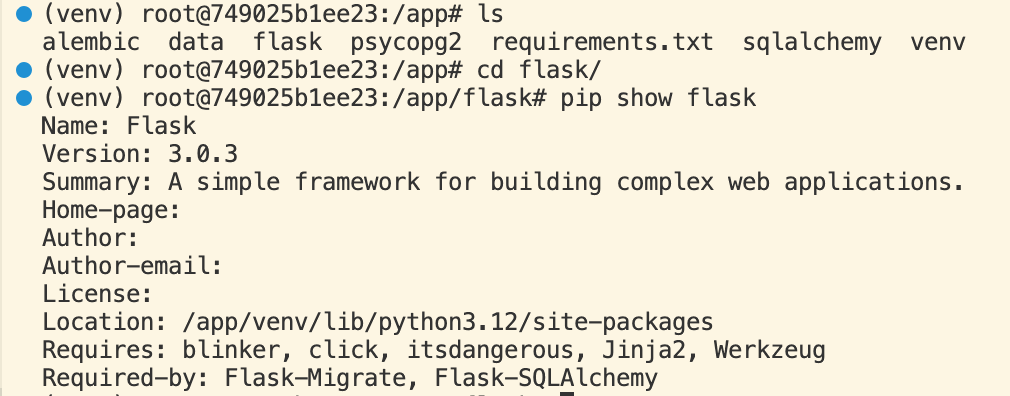
The flask python module was downloaded and installed within a venv virtual environment.
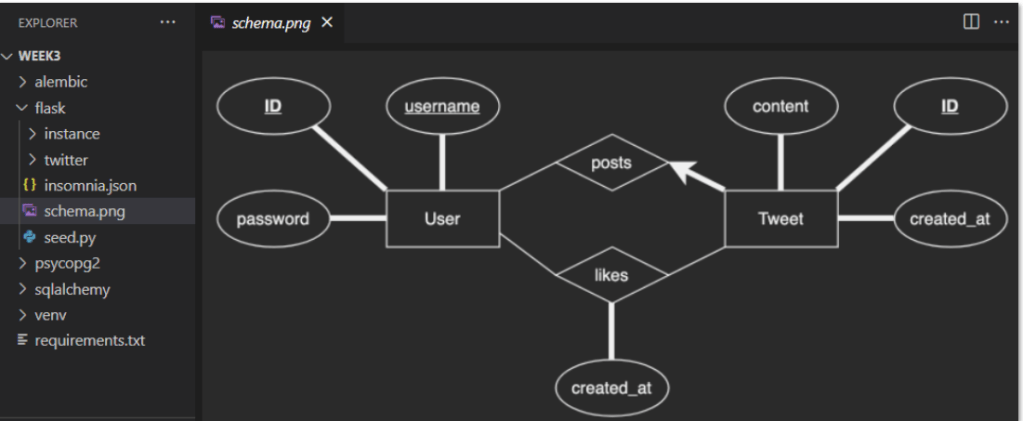
To build a twitter/X like application, like above, first need to build the DB tables for the above ER diagram, using Flask’s migration tool.
Here is a good resource for Full Stack Python using Flask: here. This resource demos a valid, simple Hello World Flask app:
from flask import Flask
app = Flask(__name__)


@app.route('/')
def hello_world():
    return 'Hello, World!'

if __name__ == '__main__':
    app.run()
Other resources: Flask Mega-Tutorial found here: This looks to be helpful- not too overwhelming or obtuse- so I’ll reference that as I go along.

Okay, back to the practicuum. Alembic to programmatically execute migrations. An ORM named SQLAlchemy to abstract away raw SQL statements. Flask as the framework for the building of the application. Tie them all together. Use the Docker flask_container in running state to use VSCode to build within app folder. psql and pgAdmin are just different ways of accessing the Postgres server – the former uses the CLI and the latter we use a GUI. Flask–migrate helps connect SQLAlchemy migrations for Flask apps using Alembic: see this resource.
On MacOS CLI, create a database that we can connect to within Flask:
docker exec -i pg_container psql -c 'CREATE DATABASE twitter;'
Create User model class for ORM
Goal: create table for twitter users, using ORM mapper SQLAlchemy. File structure: [container] > flask > twitter > src > models.py. In that models.py file:
Below: class User instantiates the User identity in the ER diagram- it had id, username, password. All three had to be included. Username and id to be unique.
from flask_sqlalchemy import SQLAlchemy // create class that allows us to user SQLAlchemy

db = SQLAlchemy() // create DB adapter object

class User(db.Model):
    __tablename__ = 'users'
    id = db.Column(db.Integer, primary_key=True, autoincrement=True)
    username = db.Column(db.String(128), unique=True, nullable=False)
    password = db.Column(db.String(128), nullable=False)
// create subclass of db.Model
Flask-migrate is tool to help Alembic and Flask work with each other.
cd flask/twitter
flask db init
flask db migrate // create migration file, stored under flask/twitter/migrations/versions folder

flask db upgrade // apply alembic migration file
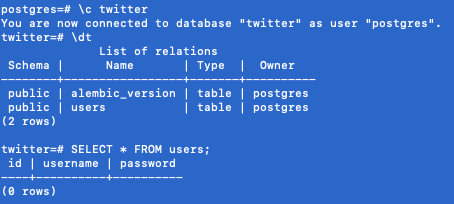
Alembic created a migration file, with migration code, that includes a function to upgrade (create a table) and downgrade (drop the table). This is a version control system file, like Github. Still need to apply the file after generated, this happens with the ‘flask db upgrade’ command. When initiated, alembic also created a table for itself within the twitter database.
Let’s do a sanity-check on the workstation CLI:
Create, migrate Tweet model class
We created users model and table. Now for the Tweet model class. A user can create many tweets, so this is a many-to-one.
class Tweet(db.Model):
    __tablename__ = 'tweets'
    id = db.Column(db.Integer, primary_key=True, autoincrement=True)
    content = db.Column(db.String(280), nullable=False)
    created_at = db.Column(
        db.DateTime,
        default=datetime.datetime.utcnow,
        nullable=False
    )
    user_id = db.Column(db.Integer, db.ForeignKey('users.id'), nullable=False)
Note that in the final line of our file above, we use a method called db.ForeignKey() provided by Flask to use the id column of the users table for the user_id foreign key column for the tweets table. By setting nullable=False, we have made the user_id column non-nullable. This means that every record in the tweets table must have one and only one user_id linked to it.
After creating the migration file (flask db upgrade) and invoking the migration file (flask db upgrade), the code runs and within that code we see the following raw SQL:

Using the workstation terminal, I checked the database to verify the tables- looks good:

Create, migrate Like model
Here’s the ER diagram again – we’re going to build the Like model now:
likes_table = db.Table(
    'likes',
    db.Column(
        'user_id', db.Integer,
        db.ForeignKey('users.id'),
        primary_key=True
    ),

    db.Column(
        'tweet_id', db.Integer,
        db.ForeignKey('tweets.id'),
        primary_key=True
    ),

    db.Column(
        'created_at', db.DateTime,
        default=datetime.datetime.utcnow,
        nullable=False
    )
)
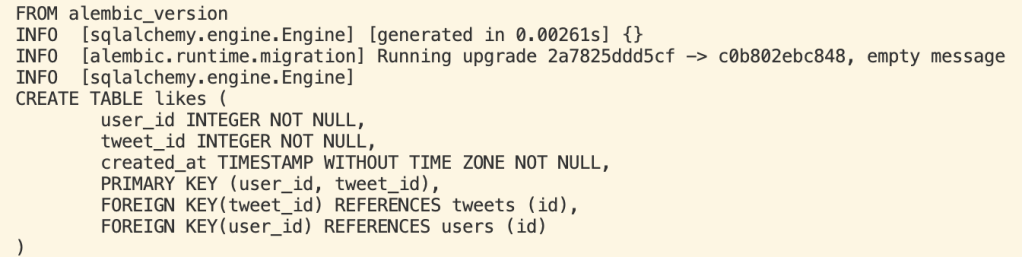
Here’s the raw sql generated when the created migration file is applied:
Flask: Up & Running
Now, to seed the database with data, use Flask Blueprints to serve as endpoints for the web serrver, and start the local Flask web server to serve those endpoints. Then we’ll test with HTTP requests using Insomnia client. Here we go!
Here’s the seed.py file code to populate the DB with fake data:
"""
Populate twitter database with fake data using the SQLAlchemy ORM.
"""

import random
import string
import hashlib
import secrets
from faker import Faker
from twitter.src.models import User, Tweet, likes_table, db
from twitter.src import create_app

USER_COUNT = 50
TWEET_COUNT = 100
LIKE_COUNT = 400

assert LIKE_COUNT <= (USER_COUNT * TWEET_COUNT)


def random_passhash():
    """Get hashed and salted password of length N | 8 <= N <= 15"""
    raw = ''.join(
        random.choices(
            string.ascii_letters + string.digits + '!@#$%&', # valid pw characters
            k=random.randint(8, 15) # length of pw
        )
    )

    salt = secrets.token_hex(16)

    return hashlib.sha512((raw + salt).encode('utf-8')).hexdigest()


def truncate_tables():
    """Delete all rows from database tables"""
    db.session.execute(likes_table.delete())
    Tweet.query.delete()
    User.query.delete()
    db.session.commit()


def main():
    """Main driver function"""
    app = create_app()
    app.app_context().push()
    truncate_tables()
    fake = Faker()

    last_user = None  # save last user
    for _ in range(USER_COUNT):
        last_user = User(
            username=fake.unique.first_name().lower() + str(random.randint(1,150)),
            password=random_passhash()
        )
        db.session.add(last_user)

    # insert users
    db.session.commit()

    last_tweet = None  # save last tweet
    for _ in range(TWEET_COUNT):
        last_tweet = Tweet(
            content=fake.sentence(),
            user_id=random.randint(last_user.id - USER_COUNT + 1, last_user.id)
        )
        db.session.add(last_tweet)

    # insert tweets
    db.session.commit()

    user_tweet_pairs = set()
    while len(user_tweet_pairs) < LIKE_COUNT:

        candidate = (
            random.randint(last_user.id - USER_COUNT + 1, last_user.id),
            random.randint(last_tweet.id - TWEET_COUNT + 1, last_tweet.id)
        )

        if candidate in user_tweet_pairs:
            continue  # pairs must be unique

        user_tweet_pairs.add(candidate)

    new_likes = [{"user_id": pair[0], "tweet_id": pair[1]} for pair in list(user_tweet_pairs)]
    insert_likes_query = likes_table.insert().values(new_likes)
    db.session.execute(insert_likes_query)

    # insert likes
    db.session.commit()


# run script
main()
I run this with ‘python seed.py’ and get this in the terminal:

and from the workstation terminal connected to the postres database:

The Twitter API has a public API and offers resources in collections- we can recreate these within our own data model. We will need to organize our endpoints into named collections. We will create a folder titled Users and Tweets, with respectively users.py and tweets.py files
Flask organizes code using blueprints. Note, I found myself wanting to pause and go through the entirety of the Flask Mega-Tutorial, it’s really interesting to see how this connects with all of the other things I’ve been learning (linux, containers, devops, etc) but I think I’ll leave that deep dive for another post. 🙂
Anywho, created blueprints for users and tweets.py files that were created:
cd twitter/src/api
mkdir USERS TWEETS
touch USERS/users.py TWEETS/tweets.py

# in users.py
from flask import Blueprint

bp = Blueprint('users', __name__, url_prefix='/users')

# in tweets.py
from flask import Blueprint

bp = Blueprint('tweets', __name__, url_prefix='/tweets')

# uncomment blueprint registration lines in __init__.py
 from .api import users, tweets
 app.register_blueprint(users.bp)
 app.register_blueprint(tweets.bp)
Testing! (Drumroll please)
Time to test. In workstation terminal:
flask runWoot!
 davethemaker