As I learn the AWS services ecosystem, using the AWS Management Console mostly, I would like to practice IaC skills using Terraform. Here’s what’s been helpful..
This video has been helpful.
Firstt, have to configure and authenticate, and I wanted to do this through VSC. Add on: AWS and Terraform modules. Click on the AWS icon after these are installed, and select VIEW > COMMAND PALETTE > AWS CREATE CREDENTIALS PROFILE.
In order to populate that, first you need to set up an IAM entity with Admin Permissions, copy those key-value pair values somewhere safe. Those key and secret access key values are used within the AWS COMMAND PALETTE.
Note, these add values to ~/.aws/config and ~/.aws/credentials files. Those are stored on your local system, and are accessed in a private manner (vs hardcoding them) in order to authenticate with AWS when attempting to access services, such as what we’ll be doing with TF (Terraform).
Create main.tf file within project folder, I used the Terraform Docs for this too:
terraform {
  required_providers {
    aws = {
      source  = "hashicorp/aws"
      version = "~> 5.0"
    }
  }
}

# configure the aws provider
provider "aws" {
  shared_config_files      = ["~/.aws/config"]
  shared_credentials_files = ["~/.aws/credentials"]
  profile                  = "example"
  region                   = "us-west-2"
}
Now that thing are configured, in that same folder, create a file to add a spot instance:
# Request a spot instance at $0.03
data "aws_ami" "debian" {
  most_recent = true
  owners      = ["136693071363"] # value from AWS AMI Marketplace for this particular AMI

  filter {
    name   = "name"
    values = ["debian-11-amd64-*"] # use regex to grab this AMI type that is desired
  }


  filter {
    name   = "virtualization-type"
    values = ["hvm"]
  }
}

resource "aws_spot_instance_request" "cheap_worker" {
  ami           = data.aws_ami.debian.id
  instance_type = "t3.micro" # nice, small, cheap

}
$ terraform init # to initialize
$ terraform plan # let TF show desired changes to be made
$ terraform apply # run TF and apply the desired changes

….
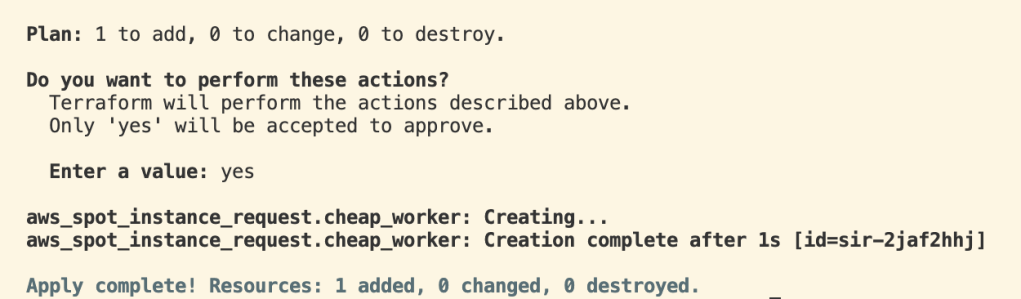
Then, over in AWS Management Console, we can see that the t3.micro EC2 instance is indeed running.
Now, let’s add a VPC:
resource "aws_vpc" "open_web_ui" {
  cidr_block           = "10.1.0.0/12"
  enable_dns_hostnames = true
  enable_dns_support   = true
}
Now let’s create a subnet, and for this we’re going to use a TF function again- this time, the cidrsubnet function. You can see the doc here.
resource "aws_subnet" "main" {
  vpc_id            = aws_vpc.open_web_ui.id
  cidr_block        = cidrsubnet(aws_vpc.open_web_ui.cidr_block, 3, 1)
  availability_zone = "us-west-2"
}
and then the Internet Gateway (IG) which references the variable name pointing to the VPC:
# IG
resource "aws_internet_gateway" "open_web_ui" {
  vpc_id = aws_vpc.open_web_ui.id
}
Let’s create a default route for the route table:
resource "aws_route_table" "open_web_ui" {
  vpc = aws_vpc.open_web_ui.id

  route {
    cidr_block = "0.0.0.0/0"
    gateway_id = aws_internet_gateway.open_web_ui.id
  }
}
and then associate the route table with the subnet:
resource "aws_route_table_association" "open_web_ui" {
  subnet_id      = aws_subnet.subnet_id
  route_table_id = aws_route_table.open_web_ui.id
}
and then we need to build an EC2 firewall, or a Security Group (SG), you can find the template data on tthe docs:
resource "aws_security_group" "allow_tls" {
  name        = "allow_tls"
  description = "Allow TLS inbound traffic"
  vpc_id      = "${aws_vpc.main.id}"

  ingress {
    description = "TLS from VPC"
    from_port   = 443
    to_port     = 443
    protocol    = "tcp"
    cidr_blocks = aws_vpc.main.cidr_block
  }

  egress {
    from_port   = 0
    to_port     = 0
    protocol    = "-1"
    cidr_blocks = ["0.0.0.0/0"]
  }

  tags = {
    Name = "allow_tls"
  }
}

------CONFIGURED AWS CODE------

resource "aws_security_group" "ssh" {
  name        = "allow-all"
  description = "Allow all inbound traffic"
  vpc_id      = aws_vpc.open_web_ui.id

  ingress {
    description = "SSH from VPC"
    from_port   = 22
    to_port     = 22
    protocol    = "tcp"
    cidr_blocks = ["0.0.0.0/0"]
  }

  egress {
    from_port   = 0
    to_port     = 0
    protocol    = "-1"
    cidr_blocks = ["0.0.0.0/0"]
  }

  tags = {
    Name = "allow_ssh"
  }
}
We are allowing SSH in port 22 and out of port 22, and for egress, anything goes! We want to be able to SSH securely into the EC2 instance, and this SG rule will allow just that. However, just like when we SSH into a physical computer, we need a key-pair to authenticate. Here’s how we do that:
resource "aws_key_pair" "deployer" {
  key_name   = "deployer-key"
  public_key = "ssh-rsa super secret aws key here!"
}
Now, we won’t actually include the key of course, but instead use a variable. This is a piece I need to still work on, but I ran TF on this code and it successfully built up the VPC, subnet, attached IG, SG. Really cool!
# Create a VPC
# resource "aws_vpc" "example" {
# cidr_block = "10.0.0.0/16"
#}

resource "aws_vpc" "open_web_ui" {
  cidr_block           = "10.0.0.0/16"
  enable_dns_hostnames = true
  enable_dns_support   = true
}

resource "aws_subnet" "subnet" {
  vpc_id            = aws_vpc.open_web_ui.id
  cidr_block        = cidrsubnet(aws_vpc.open_web_ui.cidr_block, 3, 1)
  availability_zone = "us-west-2a"
}

# IG
resource "aws_internet_gateway" "open_web_ui" {
  vpc_id = aws_vpc.open_web_ui.id
}

resource "aws_route_table" "open_web_ui" {
  vpc_id = aws_vpc.open_web_ui.id

  route {
    cidr_block = "0.0.0.0/0"
    gateway_id = aws_internet_gateway.open_web_ui.id
  }
}


resource "aws_route_table_association" "open_web_ui" {
  subnet_id      = aws_subnet.subnet.id
  route_table_id = aws_route_table.open_web_ui.id
}

resource "aws_security_group" "ssh" {
  name        = "allow-all"
  description = "Allow all inbound traffic"
  vpc_id      = aws_vpc.open_web_ui.id

  ingress {
    description = "SSH from VPC"
    from_port   = 22
    to_port     = 22
    protocol    = "tcp"
    cidr_blocks = ["0.0.0.0/0"]
  }

  egress {
    from_port   = 0
    to_port     = 0
    protocol    = "-1"
    cidr_blocks = ["0.0.0.0/0"]
  }

  tags = {
    Name = "allow_ssh"
  }
} davethemaker