For better understanding building out AWS architecture, and to include my using an architectural diagram to guide my efforts (bear with me, this is my fledgling attempt so it’s a bit rough!). Here’s what I will be building out – a basic architecture supporting the spinning up of an EC2 instance:
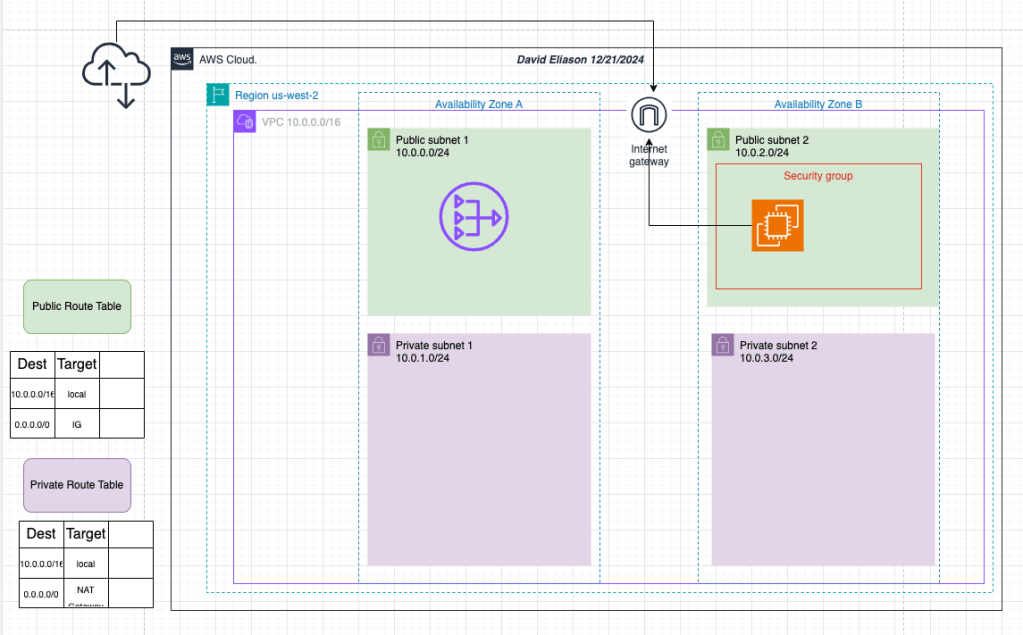
The steps I plan to take:
- First, create a VPC with a IPv4 CIDR of 10.0.0.0/16 # This will give lots of potentail subnets and IP addresses for nodes
- At the same time as building that, create a public and private subnet within the same AZ
- For failover and redundancy reasons, create a second public and private subnet within a different AZ.
- Create Internet Gateway
- Create a public and private route table
- Associate these two route tables to the respective public or private subnet
- Add appropriate routes. For the public route table, add a route pointing to the IG
- Add security group with permissions for SSH from anywhere (this will be attached to the EC2 instance)
- Launch a EC2 instance in the pubic subnet and attach the SG that was just created (allowing SSH)
- Test the configuration by SSH into the instance
Implementation
Okay, I used the wizard for this exercise, but please know that I did build this out “by hand” before doing this blog! I wanted to focus on the logic and all the components, overall, for this iteration. I let the wizard know that I wanted a VPC, 2 AZ, 2 public subnets, 2 private subnets, configured the IP address ranges, and assigned a NAT gateway as well. Two route tables were created automatically-nice. I had set the DNS hostnames and DNS resolution to be enabled. An IG was provisioned automatically, so I know that there will be a route (0.0.0.0/0) pointing to the IG in each of the newly-created route tables. The route tables were associated to the subnets automatically. Ah, man, I am not a fan of this wizard, hands-off approach, I like to get my hands dirty and build it out myself!
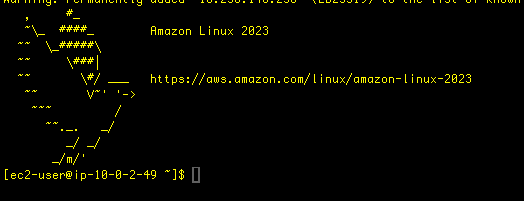
Honestly, the wizard pretty much took care of everything. I checked that there was a route table associated to each of the AZs. I added security group route allowing SSH to the EC2 instance which was spun up in the public subnet of AZ – 2. The associated route table to both public subnets pointed a local route as well as to the IG. I went through my head, “Did I get everything? Did I check all the boxes?” So, the moment of truth- I spun up the EC2 instance, grabbed the public IPv4 IP address, and used that to ssh into the insttnace. Success!
So this was a nice practice to get more comfortable with a process flow of spinning up a potential solution for a client.
 davethemaker