In this exercise, I want to gain additional experience working with Elastic Block Storage – one of three types of storage that AWS offers (the othes include Block and EFS/FSx file storage). I’m going to be creating an EBS volume and then then working with it. Let’s take a look:
I have a t3.micro EC2 instance located in us-west-2a AZ. It has a public IPv4 and private IPv4 address. It has a 8GiB volume EBS attached as /dev/xvda, which is not encrypted, 100 IOPS as gp2 type. I want to create a new volume, so I select a really cheap instance: gp2 with 1 GiB and then attach it to the EC2 instance
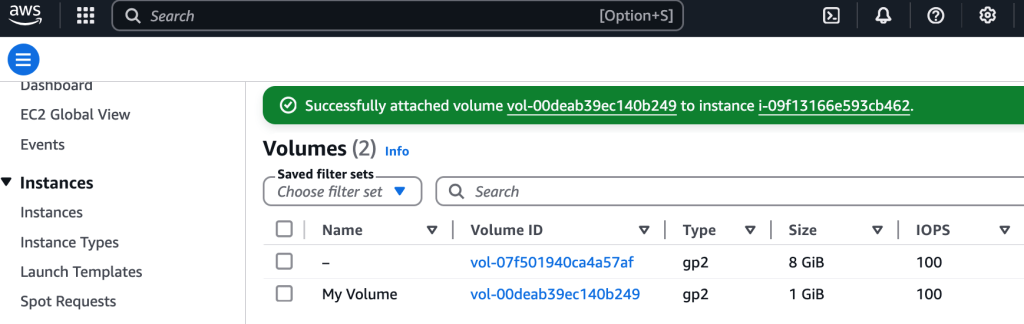
I used EC2 Instance Connect to connect to the EC2 instance

Linux time!
Okay, let’s get to work
$ df -h # view storage, new volume isn't shown
$ sudo mkfs -t ext3 /dev/sdf # create file system
$ sudo mkdir /mnt/data-store # mkdir dir to mount FS
$ sudo mount /dev/sdf /mnt/data-store # mount drive to mounting point
$ echo "/dev/sdf   /mnt/data-store ext3 defaults,noatime 1 2" | sudo tee -a /etc/fstab # ensure the volume is mounted even if/when the instance is restarted

**let's take a closer look at that last command:
$ cat /etc/fstab
# output: UUID=6e0a14ae-711e-45fe-985e-716390c27fd9     /           xfs    defaults,noatime  1   1
/dev/sdf   /mnt/data-store ext3 defaults,noatime 1 2
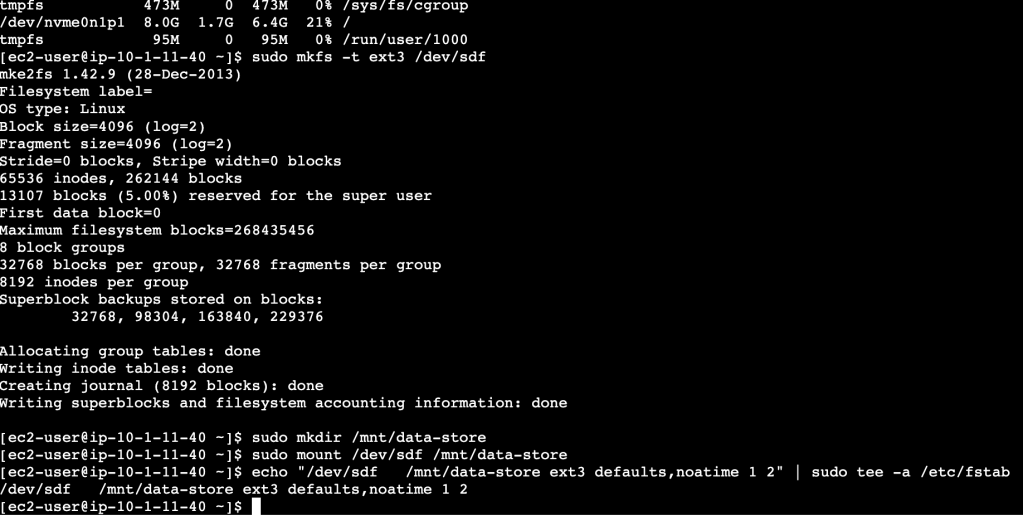
Now, when I run the $df -h command to see disk usage, I see the volume is mounted:

Creating an EBS Snapshot
This step is pretty easy- just select the volume, Actions > Create Snapshot and add tags, and boom! done

Now, to restore it, go to Snapshots > select snapshot > Actions: Create volume from snapshot. This is a helpful skill to know, because snapshots can be used as a backup solution, or for re-creating an instance in another region, or create a golden image where you have things configured just the way you like!
 davethemaker